
View your agent execution history, including past runs and scheduled runs.
Agent runs overview
The Agent Runs page shows all agent activity so you can review when agents ran and what inputs were used.
It includes:
- Past runs
- Scheduled runs
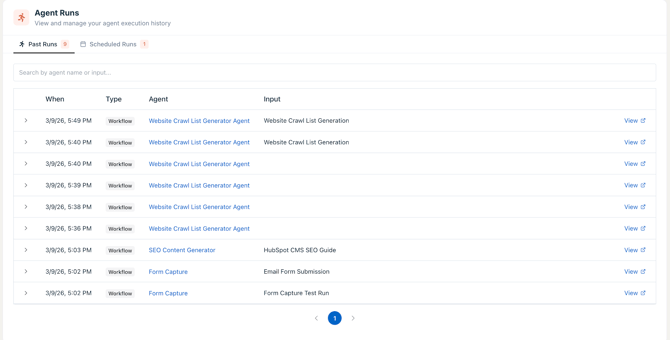
Past runs
View a history of completed agent runs.
In this tab, you can:
- See when a run was executed
- View the agent used
- See the input used
- Identify the run type (e.g., workflow)
- Open full run details
Table columns:
- When
- Type
- Agent
- Input
- View
Search runs
Use the search bar to find runs by agent name or input.
To view run details:
- Go to Agent Runs
- Select Past runs
- Click View on any run
Scheduled runs
View agents that are set to run automatically.
In this tab, you can:
- See scheduled agents
- Update how often they run
- Delete a scheduled run
Run count
Each tab shows the number of runs available.
This helps you quickly understand how many past or scheduled runs exist.
Questions about a recent agent run? Reach out to our support team