
The Agents Team page shows agents you’ve added to your team—this functions like a bookmark list for quick access to agents you use frequently.
Save an agent
Add an agent to your saved list to access it later.
To save an agent:
- Open an agent
- Click the Team button
- The agent will appear in My Saved Agents
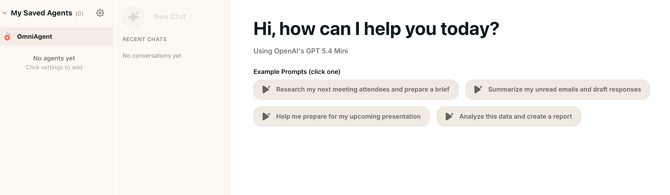
Use a saved agent
Run any saved agent directly from this page.
To run an agent:
- Go to My Saved Agents
- Select an agent from the list
- Use the chat panel to start a task
Chat with your agents
The My Saved Agents page includes a built-in chat interface.
You can:
- Ask questions
- Run tasks using agents
- Start new conversations
- Continue previous chats
The chat panel also shows:
- Recent chats
- Conversation history
Example prompts
Use example prompts to get started quickly.
To use an example prompt:
- Go to My Saved Agents
- Click any suggested prompt
Examples include:
- Research meeting attendees and prepare a brief
- Summarize unread emails and draft responses
- Prepare for a presentation
- Analyze data and create a report
These prompts help you start common tasks without writing input manually.
Remove an agent
Remove an agent from your saved list at any time.
To remove an agent:
- Open the agent
- Click the Team button again to deselect it
The agent will be removed from My Saved Agents.
Reach out to our support team if you need any help with your agent team.