
Manage your profile, preferences, integrations, and account settings from one place.
Table of Contents
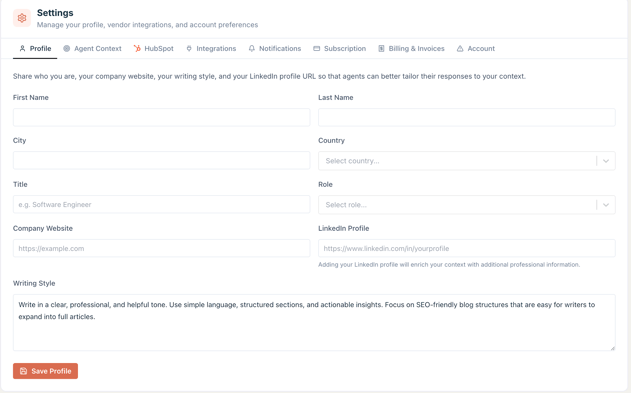
Profile
Share your personal and professional details so agents can tailor responses to your context.
To update your profile:
- Go to Settings
- Fill out any fields you’d like agents to reference in their responses
- Click Save
Agent Context
Provide additional context so agents can deliver more relevant and personalized results.
Email agent instructions
Add custom instructions for how the email agent should respond on your behalf.
Business profile
Define key details about your business:
- Product description
- Ideal customer profile
- Pain points
- Differentiators
- Core value propositions
- Competitors
- Proof points (claim, evidence, source)
- Sales process stages
Start with product description, pain points, and value propositions for the biggest impact.
Advanced context files
Use markdown-based files to shape agent behavior:
- USER.md
- SOUL.md
- IDENTITY.md
- AGENTS.md
- TOOLS.md
- MEMORY.md
These files are included in agent prompts to improve output quality.
HubSpot
Connect your HubSpot account to enable CRM-powered agent integrations.
To connect HubSpot:
Connect your HubSpot account to enable CRM-powered agent integrations.
Integrations
Connect external services used by your agents.
Available integrations:
- X (Twitter)
Google connection includes:
- Gmail
- Calendar
- Drive
To connect an integration:
- Go to Settings
- Click Integrations
- Select a service
- Complete the connection flow
Note: HubSpot integration is managed in the HubSpot tab.
Notifications
Manage your email notification preferences. Changes are saved automatically.
Available notification types:
- New follower — when someone follows your profile
- Agent ratings — when someone rates one of your agents
- Agent emails — allow agents to send you email notifications
To update notifications:
- Go to Settings
- Click Notifications
- Enable or disable options
Agent email notifications
- Individual agent settings appear after an agent sends you an email
- Scheduled agents appear when scheduled runs are configured
Subscription
Manage your premium agent subscriptions.
In this section:
- View active subscriptions
- Manage billing cycle
If you do not have an active subscription, this section will be empty.
Billing and invoices
Manage your billing details and invoice history.
Available options:
- Payment method
- Invoice information
- Invoice history
If no billing activity exists, no invoices will appear.
Account
Delete your account and all associated data.
To delete your account:
This action cannot be undone.
Reach out to our support team if you have any questions about user settings or navigating Agent.ai.